
The parking intercom that's also a second layer of access control
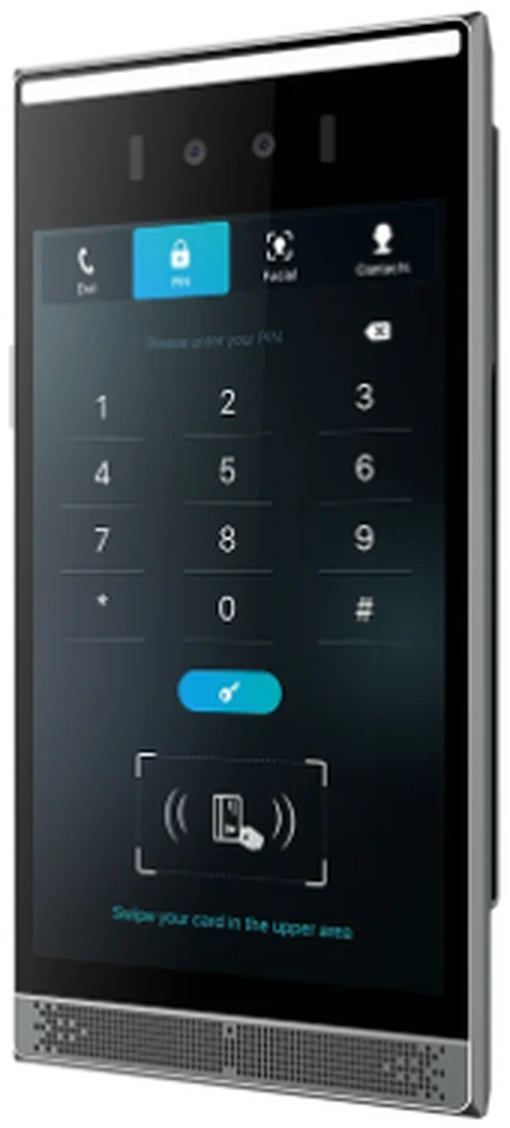
At the lane, on the island, an 8-inch touchscreen with a camera in it. A driver can call your team on live video — or get through without calling: type a license plate, enter a hotel room number, show a face, a PIN, a pattern or a card. Which credentials a lane accepts, and whether it needs two of them to agree, is configured in NoctoPark Core.
What the intercom delivers
A gate intercom, and every other way into the lot
Most parking intercoms do one thing: connect a stuck driver to a person. This one does that on live video with HD audio — and, before anyone has to call, offers the driver five other ways to prove who they are.
Plate plus one more
Configure a lane to require the plate read and a second credential that agrees with it.
Touchscreen
Plate, room number, PIN or pattern typed at the lane; a face read by the camera above it.
Two-way HD video
The driver sees your team, your team sees the driver and the lane, and can open the gate from the call.
Sealed and impact-rated
Aluminum housing, rated for rain, dust and the occasional bumper.
Parking Intercom
One lane, four ways through
The same intercom serves four different situations without anyone changing a setting at the gate. A plate the camera couldn't read gets typed in. A hotel guest enters their room number and Core checks it against the property system. A registered employee is recognized by face. And when none of that fits, one tap puts the driver on video with your team, who see the lane and open it from the call.
Four flows, one device, no attendant. Every one of them is logged in Core with the intercom's own video of the lane.
Datasheet on request
The full datasheet, supported card standards, integration protocols and the credential policies available per lane are covered with you for your site during the conversation.
What the intercom decides
Second factor agrees
Guest validated via PMS
Staff recognized
Operator reached
Logged, with video
Where the intercom goes
On the island at driver-window height, and at the doors that lead to the lot.
Gated lanes
Beside the camera on the entry and exit islands, where a driver can reach the screen without leaving the car.
Hotel and residential entries
Room number for guests, face or PIN for residents and staff, a call to the desk for everyone else.
Pedestrian and garage doors
The same device secures the doors into the garage, so the lot and the building share one credential set.
Questions
Frequently asked
What does "second layer of access control" mean here?
A lane can be configured to require two things that agree: the plate the camera read, and a credential the driver presents at the intercom — a face, a PIN, a pattern, a card or a room number. If they don't match, the gate stays down and the event is logged with video.
What happens when the camera can't read a plate?
The driver types it on the touchscreen. Core matches it the same way it would a camera read — against a permit, a reservation or a paid session — and the gate opens. Nothing is dispensed and nobody has to call.
How does the hotel room number work?
The guest enters their room number; Core checks it against the property management system and, if the room has parking, opens the gate and bills the stay to the folio. It works with Oracle OPERA Cloud and other hotel systems through the same integration as the rest of NoctoPark.
Is facial recognition safe to use?
It includes liveness detection, so a photo, a video or a mask on a phone screen does not pass. Whether a site uses it at all, and for whom, is a policy you set in Core — many lots use it only for staff and rely on plate and PIN for everyone else.
Who installs it?
A certified NoctoPark partner in your region mounts and wires the intercom with the camera and gate; NoctoPark configures the credential policy for each lane in Core, activates and supports.
Let's get started
See a driver get through without calling
Thirty minutes: a typed plate, a room number, a face — and the one call that still reaches a person.